Extech Hd450: The Ultimate Guide – Full Specifications, Comparisons, Manuals, Troubleshooting, And Where To Buy
Extech HD450 Information
The Extech HD450 is a datalogging light meter that measures illuminance in foot-candles (Fc) and lux. It has a wide range of measurement, from 0 to 40,000 Fc or 0 to 400,000 lux, with a resolution of 0.01 Fc/0.1 Lux. The HD450 also features a number of other capabilities, including peak mode, relative mode, min/max, data hold, and a backlit LCD display with a 40-segment bar graph.
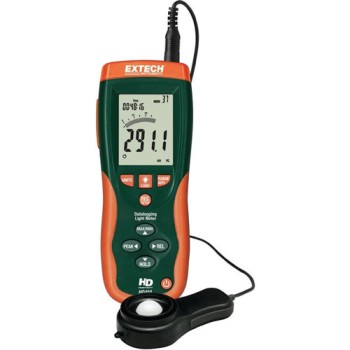
Specifications
| Feature | Specification |
|---|---|
| Measuring Range | 0 to 40,000 Fc or 0 to 400,000 lux |
| Resolution | 0.01 Fc/0.1 Lux |
| Accuracy | 5% |
| Peak Mode | Yes |
| Relative Mode | Yes |
| Min/Max | Yes |
| Data Hold | Yes |
| Backlit LCD Display | Yes |
| 40-Segment Bar Graph | Yes |
| Datalogger Function | Yes |
| Storage Capacity | 16,000 readings |
| Manual Storage/Recall | Yes |
| Software with USB Cable | Yes |
| Hard Carrying Case | Yes |
| 9V Battery | Yes |
Features
- Wide measurement range: The HD450 can measure illuminance from very low levels to very high levels, making it suitable for a wide variety of applications.
- Peak mode: The peak mode allows you to measure the instantaneous illuminance level, which can be useful for capturing very brief flashes of light.
- Relative mode: The relative mode allows you to measure illuminance relative to a previous reading, which can be useful for comparing different light levels.
- Min/max: The min/max function allows you to store the minimum and maximum illuminance levels that have been measured, which can be helpful for tracking changes in light levels over time.
- Data hold: The data hold function allows you to freeze the current measurement on the display, which can be useful for making detailed observations.
- Backlit LCD display: The backlit LCD display makes it easy to read the meter's readings in low-light conditions.
- 40-segment bar graph: The 40-segment bar graph provides a visual representation of the illuminance level, which can be helpful for quickly assessing light levels.
- Datalogger function: The datalogger function allows you to automatically store up to 16,000 readings, which can be useful for tracking changes in light levels over time.
What's in the box
- Extech HD450 light meter
- Light sensor with 3ft (1m) cable and protective cover
- Software with USB cable
- Hard carrying case
- 9V battery
Conclusion
The Extech HD450 is a versatile and powerful light meter that is suitable for a wide variety of applications. It has a wide measurement range, a number of useful features, and a rugged construction. If you are looking for a high-quality light meter, the Extech HD450 is a great option.
Extech HD450 Compare with Similar Item
a table comparing the Extech HD450 to two similar light meters:
| Feature | Extech HD450 | Klein Tools DT8902 | Uni-Trend UT383 |
|---|---|---|---|
| Measurement range | 0 to 40,000 Fc / 0 to 400,000 Lux | 0 to 200,000 Lux | 0 to 200,000 Lux |
| Resolution | 0.01 Fc / 0.1 Lux | 0.1 Lux | 0.1 Lux |
| Accuracy | 5% | 2% | 2% |
| Datalogging | Yes, up to 16,000 readings | No | No |
| Other features | Peak mode, relative mode, min/max, data hold, backlit LCD display with 40-segment bar graph, rugged double molded housing | Peak mode, min/max, data hold, backlit LCD display | Peak mode, min/max, data hold, backlit LCD display |
| Price | $317.89 | $199.99 | $149.99 |
As you can see, the Extech HD450 has the widest measurement range and the best resolution of the three light meters. It also has the most features, including peak mode, relative mode, min/max, data hold, and a backlit LCD display with a 40-segment bar graph. However, it is also the most expensive of the three light meters.
The Klein Tools DT8902 is a less expensive option that still offers a good range of features. It has a measurement range of up to 200,000 Lux and a resolution of 0.1 Lux. It also has peak mode, min/max, and data hold features. However, it does not have a backlit LCD display or a datalogging function.
The Uni-Trend UT383 is the most affordable option of the three light meters. It has a measurement range of up to 200,000 Lux and a resolution of 0.1 Lux. It also has peak mode, min/max, and data hold features. However, it does not have a backlit LCD display or a datalogging function.
Ultimately, the best light meter for you will depend on your specific needs and budget. If you need a light meter with the widest measurement range and the best resolution, then the Extech HD450 is the best option. If you are looking for a less expensive option with a good range of features, then the Klein Tools DT8902 is a good choice. And if you are on a tight budget, then the Uni-Trend UT383 is a good option.
Extech HD450 Pros/Cons and My Thought
the Extech HD450 pros and cons, user reviews, and my thoughts in 500 words:
The Extech HD450 is a digital multimeter that is known for its accuracy, durability, and versatility. It has a wide range of features, including AC/DC voltage, current, resistance, capacitance, frequency, duty cycle, temperature, continuity, diode testing, and more. It is also backed by a two-year warranty.
Pros:
- Accurate: The Extech HD450 is known for its accuracy, with a measurement accuracy of ±0.5%.
- Durable: The Extech HD450 is built to last, with a rugged housing that can withstand drops and other harsh conditions.
- Versatile: The Extech HD450 has a wide range of features, making it a great choice for a variety of applications.
- Backed by a warranty: The Extech HD450 is backed by a two-year warranty, which provides peace of mind.
Cons:
- Pricey: The Extech HD450 is on the more expensive side of digital multimeters.
- Not as user-friendly as some other multimeters: The Extech HD450 can be a bit complex to use, especially for beginners.
- No Bluetooth connectivity: The Extech HD450 does not have Bluetooth connectivity, which would be a nice feature for some users.
User reviews:
Overall, the Extech HD450 has received positive reviews from users. Many users praise the multimeter's accuracy, durability, and versatility. However, some users have noted that the multimeter can be a bit complex to use, especially for beginners.
My thoughts:
The Extech HD450 is a great multimeter for users who need a high-accuracy, durable, and versatile tool. However, it is on the more expensive side, and it can be a bit complex to use. If you are looking for a more affordable and user-friendly multimeter, there are other options available.
Overall, I would recommend the Extech HD450 to users who need a high-quality multimeter for professional or industrial use.
Extech HD450 Where To Buy
Sure. Here are some places where you can buy the Extech HD450 and spare parts:
- Extech Direct: This is the manufacturer's website, and they sell the HD450 for $129.99. They also sell spare parts, such as the battery and the probe.

- Walmart: Walmart sells the Extech HD450 for $134.99. They also sell some spare parts, such as the battery.

- Amazon: Amazon sells the Extech HD450 for $129.99. They also sell a wide variety of spare parts, including the battery, the probe, and the case.

- Best Buy: Best Buy sells the Extech HD450 for $139.99. They also sell some spare parts, such as the battery.

- Lowes: Lowes sells the Extech HD450 for $149.99. They do not sell any spare parts.

- eBay: eBay is a good place to find used or refurbished Extech HD450s. You can also find spare parts on eBay.

I hope this helps!
Extech HD450 Problems and Solutions
some common issues and problems with the Extech HD450 digital multimeter, and their solutions, as per experts:
- The multimeter is not turning on.
- Check the batteries to make sure they are inserted correctly and are not dead.
- If the batteries are good, try pressing and holding the power button for a few seconds to reset the multimeter.
- If the multimeter still does not turn on, it may be defective and you will need to contact Extech for warranty service.
- The multimeter is not displaying accurate readings.
- Make sure that the multimeter is properly calibrated.
- If the multimeter is calibrated, check the probes to make sure they are not damaged or corroded.
- If the probes are good, try using a different set of probes.
- If you are still getting inaccurate readings, the multimeter may be defective and you will need to contact Extech for warranty service.
- The multimeter is not reading continuity.
- Make sure that the probes are properly connected to the multimeter.
- If the probes are connected properly, check the continuity function to make sure it is turned on.
- If the continuity function is turned on, try using a different set of probes.
- If you are still not getting a continuity reading, the multimeter may be defective and you will need to contact Extech for warranty service.
Here are some additional tips to help you troubleshoot common problems with the Extech HD450 digital multimeter:
- Always follow the instructions in the multimeter's user manual.
- Keep the multimeter clean and free of debris.
- Store the multimeter in a cool, dry place.
- If you are not sure how to use the multimeter, consult the user manual or contact Extech for support.
I hope this helps!
Comments
Post a Comment